SchoolStatus Connect
- 4.8
- Rating
- 1.00M
- Installs
- Free
- Price

 Analysis by App-foxy
SchoolStatus Connect is the kind of education app I would recommend when the main problem is not a lack of communication, but communication scattered across too many places. It is built for family–teacher messaging, and in everyday use its value comes from giving school conversations a more defined home than personal texting, email threads, or paper notices. I see it as a practical bridge between classrooms and families rather than a full replacement for every school system.
The app is free, aimed at everyone, and developed by SchoolStatus, LLC. It belongs in the education category, but its usefulness is especially clear for parents, guardians, teachers, and school communities that need a straightforward way to keep classroom contact organized. I found the idea easy to understand: instead of wondering whether an important message went to email, a group chat, or a child’s backpack, families can use one school-focused channel.
How SchoolStatus Connect feels in current use
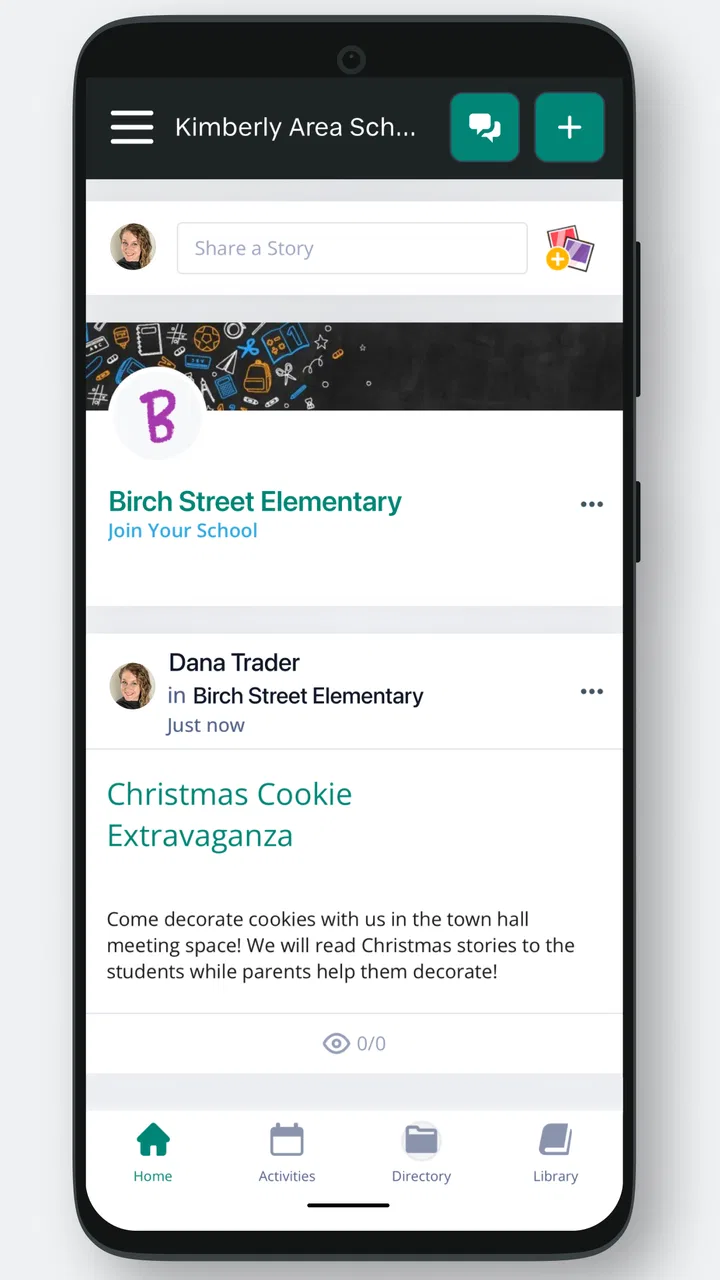
The first thing I noticed is that the app’s purpose is narrower and more useful than the word “communication” can sometimes suggest. It is not trying to be a social network, a general-purpose messenger, or a digital classroom packed with learning tools. Its center of gravity is the exchange between educators and families. That focus makes it easier to judge: if your school uses it consistently, it can reduce the small daily uncertainty around announcements, questions, reminders, and follow-up.
You May Also Like

 Blood Strike: 2.5 Anniversary
Blood Strike’s Loadouts Turn Every Drop Into a Tactical Gamble
A close look at Blood Strike’s custom loadouts: how fast access to signature weapons reshapes its battle royale rhythm, rewards preparation, and narrows the gap between fights.

 Pandora - Music & Podcasts
Pandora’s Music Is Easy to Start, but Harder to Recover
Pandora’s strength is its low-effort path from a seed to a station. Its weak spot is how much confidence it asks you to place in connection, setup, and quiet recovery.

 8 Ball Pool
 Is Built on Rivalries, Rematches, and Routine
A close look at the rivalries, rematches, shared routines, and unanswered safety questions that turn a quick pool match into a persistent mobile community.

 Samsung Music
’s Quiet Strength Is Playing What You Already Own
Its reach comes less from spectacle than from dependable access to a personal library. That simplicity is both the app’s strongest retention engine and its ceiling.

 AccuWeather: Weather Radar
AccuWeather Review: A Quick, Clear Forecast for Everyday Decisions
For everyday plans, the best forecast is the one you can understand quickly. AccuWeather makes rain timing, radar, and local conditions easy to act on, with a few trade-offs.

 Hill Climb Racing
Why Hill Climb Racing Still Turns Crashes Into One More Run
A tiny car, a bumpy hill and one more upgrade: Hill Climb Racing keeps resurfacing because its simple chaos makes every near-miss feel personal.
More From Our News Desk



For a parent, the practical benefit is continuity. A teacher can send a message through the school’s chosen channel, and the family has a better chance of seeing it in the same place where other school communication appears. For a teacher, the advantage is having a communication route associated with the classroom rather than relying on a personal phone number. That distinction matters because boundaries are easier to maintain when school contact does not depend on informal texting.
I would not describe the experience as exciting, and that is a compliment in this case. A family messaging tool should feel predictable. The strongest use of SchoolStatus Connect is often a quiet one: checking a message, replying when necessary, and returning later to understand what was discussed. The app’s role is to remove friction from routine contact, not to turn a school announcement into an event.
The current Android release is version 1.36.3, and the app works with Android 5.0 or later. That broad compatibility is helpful for families using older phones, especially in households where not everyone upgrades devices at the same time. It also makes the app easier for schools to suggest without immediately excluding people with modest hardware. Still, compatibility alone does not guarantee a smooth experience; the quality of the school’s setup and the habits of its teachers remain just as important.
Its public reception is strong, with an average of 4.8 from around 7.5 thousand ratings and more than a million installs. I treat those numbers as encouraging rather than conclusive. A messaging app can feel excellent in one school and disappointing in another because the real experience depends on whether staff use it regularly, whether families are connected to the right classrooms, and whether expectations about replies are clear.
The everyday scenario where it makes the most sense
Imagine a parent who works during the day and cannot answer a call from school. Later, that parent opens the app, reads a classroom message, and replies when there is time to concentrate. If the teacher needs a simple answer about a child’s situation, the exchange can happen without the parent searching through a crowded personal inbox. That is a modest improvement, but repeated small improvements are exactly where this type of app earns its place.
Another useful situation is a household with more than one caregiver. School communication can become difficult when one adult receives an email, another receives a paper note, and a third is expected to know what was said during a phone call. A shared school-oriented routine can make responsibility clearer. I would still encourage families to agree on who checks messages and how urgent information should be handled, because no app can solve confusion caused by unclear household habits.
Teachers may also benefit when they need to send the same classroom information to several families without exposing personal contact details. A school messaging environment creates a more professional setting than a collection of individual text conversations. It can also make it easier to keep school-related communication separate from personal conversations, which is valuable for both sides.
What the app’s evolution tells me
SchoolStatus Connect was released on October 19, 2016, so it is not a new experiment trying to prove that families and teachers should communicate digitally. Its current version shows an established product that has continued to be maintained over time. I cannot treat a version number by itself as proof of a particular feature or redesign, but it does suggest that the app is still being carried forward rather than abandoned after its initial launch.
That matters for existing users. A long-running communication app has to deal with changing phones, changing school years, and families moving between classrooms. Continued version development is relevant because messaging tools are only useful when they remain available as the rest of a school’s technology changes. I would still install updates promptly, especially for an app used for school contact, because current software is generally the sensible starting point for reliability and compatibility.
The product’s evolution also appears to have preserved its central identity instead of turning it into an overloaded education suite. I like that direction. There are already learning platforms for assignments, video lessons, grades, and document sharing. Adding every possible school function to a messaging app can make basic communication harder to find. SchoolStatus Connect makes more sense when treated as a communication layer that may work alongside those systems.
For someone already using an older release, the practical question is not whether the app has become a completely different product. It is whether the current version continues to support the school’s communication routine without forcing families into a new set of unrelated tools. My advice is to update, sign in with the school’s current instructions, and check that classroom connections are correct before relying on it for important messages.
How it compares with email, texting, and school portals
Email remains the obvious alternative. It is familiar, searchable, and available on nearly every device. For long explanations or attachments, email may still be more comfortable. Its weakness is that school messages can disappear among receipts, newsletters, work correspondence, and automated alerts. SchoolStatus Connect has a clearer purpose, so I prefer it for routine classroom contact when the school actively uses it.
Text messaging is faster and often gets noticed immediately, but it can blur personal and professional boundaries. It may also leave families unsure whether a message is official, whether replies are expected, or which number should be used. A dedicated school app is less convenient if a family rarely checks it, but it gives the conversation a more appropriate context.
Full school portals can offer more information in one place, including schedules, grades, attendance, calendars, and assignments. If your priority is managing the entire academic record, a portal may be the better primary tool. SchoolStatus Connect is more appealing when the missing piece is human contact: a question to a teacher, a classroom reminder, or a family-facing message that needs a response.
There is also a trade-off with general chat platforms. Families may already use a group in another service, and that can feel quicker at first. However, school communication should not depend entirely on whichever platform a small group happens to prefer. A school-specific app is easier to justify when the institution wants one consistent channel and a clearer separation from private social spaces.
Small workflow choices that make a real difference
My first practical tip is to treat the app as a message queue rather than an emergency line. Check it at a predictable time on school days, but do not assume that a teacher will see an urgent message instantly. If something affects a child’s immediate safety, transportation, or attendance, follow the school’s established urgent-contact process instead of depending on a normal app conversation.
My second tip is to write replies with enough context to stand on their own. A short answer such as “yes” may make sense in the moment but become confusing later, especially when several classroom topics are active. Mentioning the child or the subject of the message in a concise way can save a follow-up exchange. This is not about writing formal emails; it is about making a school conversation understandable when you return to it.
A third useful habit is to use the app for school matters and keep personal discussion elsewhere. That boundary helps teachers manage their workload and helps families avoid turning every small concern into a constant stream of notifications. If a topic needs a meeting, the best outcome may be using the message to arrange that conversation rather than trying to resolve a sensitive issue through a long series of short replies.
For teachers, I would recommend deciding on communication expectations early. Families need to know what kinds of questions belong in the app, when replies are normally handled, and what information should be sent through another school process. The application can organize contact, but it cannot replace a clear communication policy. Without that shared understanding, even a good messaging tool can create pressure to respond at all hours.
For families with multiple children, I would double-check the classroom or school connections after enrollment changes. A messaging app is only useful when the right adults are seeing the right conversations. This is one of the less obvious points that a short store description cannot explain: account setup and classroom organization may matter more than the messaging screen itself.
Where the experience can fall short
The largest limitation is dependence on adoption. If one teacher uses SchoolStatus Connect while another relies on email, and the office posts updates somewhere else, families still have to monitor several channels. The app cannot unify communication that the school has not unified in practice. Before making it part of your routine, I would ask the school which messages are expected to appear there and whether all relevant teachers participate.
There is also a learning curve for people who are already overloaded with school technology. Even a simple app adds another login, another notification source, and another place to remember. That burden may be small for an engaged parent, but it can be meaningful for grandparents, caregivers, or families sharing devices. A school should provide clear onboarding rather than assuming that installing the app automatically solves access.
I would also avoid expecting it to replace a learning management system. If you need detailed assignment workflows, structured course materials, grading tools, or a complete academic dashboard, a dedicated education platform is likely more appropriate. SchoolStatus Connect is strongest when the task is conversation. It becomes a weaker fit when users expect it to function as the entire digital campus.
Notification habits deserve attention too. Too many alerts can make families mute the app, while too few can cause important messages to be overlooked. I would review the phone’s notification settings after installation and make sure the app is not silently hidden by a battery-saving or focus mode. At the same time, I would resist enabling every alert automatically if the school sends frequent low-priority updates.
Privacy and boundaries are another reason to use the app thoughtfully. A school communication channel is more suitable than personal social media for classroom contact, but families should still share only information relevant to the child’s education and follow the school’s guidance for sensitive matters. Teachers also need room to be unavailable outside working hours. The app can support better boundaries, but only if people use it with those boundaries in mind.
Who should use it, and who may prefer something else?
I think SchoolStatus Connect is a good fit for families whose schools have committed to it as a regular communication channel. It is especially useful for parents who want school messages separated from personal email, teachers who need a professional route to families, and caregivers who benefit from a consistent place to check classroom contact.
It is less compelling for someone whose school barely uses it. In that situation, installing the app may create another inbox without reducing confusion. I would also hesitate to recommend it as the only tool for families who need comprehensive academic management. A portal or learning platform may be better for grades, assignments, attendance, and course resources, while this app handles the conversational side.
Families who strongly prefer instant text messages may find a dedicated app slower simply because it requires opening a separate service. That is a real convenience trade-off, not a flaw that can be dismissed. The benefit is organization and professional separation; the cost is one more place to check. Whether that exchange is worthwhile depends largely on how disciplined the school is about using the platform.
The Everyone content rating makes it suitable for a broad audience, which is appropriate for a family–teacher communication tool. I would still set it up with the adult responsible for school contact and explain the routine to any caregiver who needs access. The age label describes general suitability, but it does not replace sensible supervision of school conversations.
What existing users and new adopters should watch
Existing users should watch for changes in how their school organizes classrooms, staff, and yearly transitions. When a child moves to a new grade or changes teachers, checking the active connections is more useful than assuming last year’s setup carries over perfectly. New users should pay attention to the school’s instructions about account creation and which contact route is considered official.
I would also watch whether the app remains focused on reducing communication gaps instead of accumulating unrelated functions. Its value is clearest when a parent can quickly identify a school message and a teacher can contact families without turning personal phone numbers into the default system. Any future evolution should preserve that clarity.
The current version, 1.36.3, is the sensible place to begin for Android users who meet the minimum operating-system requirement. I would keep the app updated, but I would judge future changes by their effect on everyday tasks: finding the right conversation, understanding who sent it, replying appropriately, and knowing when another school channel is required. A new interface is only meaningful if those basics become easier.
SchoolStatus Connect is free, which removes one obvious barrier for families and schools considering it. The more important cost is attention: users must remember to check it, schools must use it consistently, and everyone must understand what belongs there. That is why I would not recommend installing it in isolation. I would first confirm that the school actually relies on it and explain how it fits with email, the school portal, and urgent contact methods.
After spending time looking at its role rather than expecting it to do everything, I came away with a favorable but measured view. SchoolStatus Connect works best as a dependable communication bridge, not as a complete replacement for a school’s entire technology system. Its strong rating and broad adoption make it worth considering, while its dependence on school participation keeps expectations realistic.
My final recommendation is simple: if your child’s school uses the app consistently, install it and make it part of a regular school-day check-in. If the school communicates through several unrelated systems, ask for a clear channel before adding another one. For the right community, SchoolStatus Connect can make family–teacher contact calmer, more professional, and easier to follow; for a school that has not committed to it, a well-managed email or portal routine may still be the better choice.
FAQs for SchoolStatus Connect
01What is SchoolStatus Connect used for?
SchoolStatus Connect is a communication platform designed to help schools, teachers, students, and families stay connected. After reviewing the app, its main purpose is to centralize school announcements, classroom messages, event information, reminders, and other updates in one place. It can make communication more organized than relying on paper notices, separate messaging services, or occasional emails.
02Who can use SchoolStatus Connect, and how do I get access?
The app is generally intended for families, educators, school administrators, and other members of participating educational communities. Access usually depends on your school or district using SchoolStatus Connect and inviting or registering you with the correct contact information. Downloading the app alone may not provide full functionality, so users should check with their school if they cannot find their organization or do not receive an activation invitation.
03What notifications and messages can I receive in the app?
SchoolStatus Connect may deliver different types of school-related communication, including general announcements, teacher messages, attendance or schedule updates, reminders, event details, and urgent notices. The exact features depend on how the school has configured its account. Notification settings can normally be adjusted on the device, but disabling them completely could cause you to miss important information from teachers or administrators.
04Is SchoolStatus Connect free to download and use?
The application is typically available as a free download for families and staff, although the services behind it are provided through participating schools or districts. Your school may determine which tools are enabled and whether any additional programs are connected to the platform. Before downloading, it is worth confirming that your school uses SchoolStatus Connect, since availability and included features can vary by institution.
05Is SchoolStatus Connect safe for sharing school and family information?
SchoolStatus Connect is built for education-related communication, so privacy and account security are important considerations. Users should create a strong, unique password, keep the app updated, and avoid sharing login details with others. Because schools control much of the information exchanged through the platform, families should review their school’s privacy guidance and contact administrators if they notice an unfamiliar message, account activity, or incorrect personal detail.
Pros
- Keeps school
- teacher
- and district messages in one convenient place.
- Supports multiple children and schools under a single parent account.
- Push notifications help families stay updated on important announcements.
- Offers access to translated messages for improved family communication.
- Provides a direct channel for contacting teachers and school staff.
Cons
- Notification volume can become overwhelming during busy school periods.
- Some features depend on the school or district enabling them.
- Account setup may require matching information from school records.
- Older devices may experience slower loading or occasional glitches.
- The app’s usefulness is limited when schools rarely post updates.

SchoolStatus Connect
Gallery